Medical/Rx
Adventure Subaru offers 2 medical plans through Anthem.
Network: Blue Access PPO
Member Services: 1-844-412-0889

Prescription Drug
Your health plan is all about giving you choices. So, when you need a prescription medicine, you can choose home delivery through
CarelonRx Pharmacy or you can keep getting your prescriptions at your local pharmacy. It’s up to you. You just need to let Anthem know what
you want to do. You’ll be able to get your prescriptions filled at your local pharmacy two times — the first fill plus one refill — before you let
Anthem know your choice. After that, you’ll have to pay the full cost for your medicines until you contact Anthem.
TIER 1 (GENERIC) | Lowest copay: Most drugs in this category are generic drugs. Members pay the lowest copay for generics, making these drugs the most cost-effective option for treatment.
TIER 2 | Low copay: This category includes non-preferred and low-cost generic drugs
TIER 3 | Higher copay: This category includes preferred, brand-name drugs that don't yet have a generic equivalent. These drugs are more expensive than generics, and have a higher copay.
TIER 4 | Highest copay: In this category are nonpreferred brand name drugs for which there is either a generic alternative or a more cost-effective preferred brand including most specialty medications. These drugs have the highest copay. Make sure to check for mail-order discounts that may be available.
Helpful Rx Cost Savings Tools & Tips:
MAIL ORDER - Many drugs are available in a 90-day supply, rather than the 30-day retail supply. Typically, you will pay less if you choose to get a mail-order 90-day supply.
GOOD Rx - There are many tools online that you can use to save on prescription costs. One is GoodRx.com, an online Rx database that allows you to find what pharmacy is the cheapest for your specific prescription. Additionally, you may be able to find a coupon that will greatly reduce your cost. It is important to remember that many of the coupons can only be used outside of your plan (which will not count towards your maximums).
ASK YOUR DOCTOR – Make sure to ask if there are cost-saving alternatives to the prescription they are providing. Many times, there are generic or different manufacturers that will save you money at the pharmacy.
Below is a high-level overview of the prescription benefits, please refer to the SBC above for more detailed information.

Dental
MetLife | Group #5937007
Dental Benefits through MetLife Dental provide comprehensive coverage to help you and your family maintain good dental health. Your coverage will be greater if you go to an in-network provider.

Vision
VSP | Group #5390069 www.vsp.com

DID YOU KNOW?
- Eye exams can help detect serious eye and general health conditions sooner: high blood pressure, diabetes, heart disease, high cholesterol
- Babies should receive their first professional eye exam at 6 months
- 80% of learning in the first 12 years comes through the eyes
Adventure Subaru offers vision coverage through MetLife which utilizes the VSP network to help pay for eye exams, prescription glasses and contact lenses. You receive a higher level of benefits when you see a provider in the VSP Network.
To find out if your provider is in-network, please visit the VSP website below.
Basic Life & AD&D
Adventure Subaru provides all full-time employees with Basic Life/AD&D coverage.
Who's Your Beneficiary? Everyone needs to make sure your beneficiary is up to date when you enroll through.
Don't forget to update your primary or secondary beneficiary if you experience a life event, such as a divorce or birth of a child.
Life Policy Conversion is available if you want to keep this coverage after you leave employment with Adventure Subaru.

Short Term Disability
Short Term Disability
Everyday illnesses or injuries can interfere with your ability to work. Even a few weeks away from work can make it difficult to manage household costs. Short Term Disability coverage provides financial protection for you by paying a portion of your income, so you can focus on getting better and worry less about keeping up with your bills. This benefit is 100% voluntary. Benefits begin the 1st day for an Accident and 8th day for an Illness and is effective for up to 13 weeks.

Anthem Services
Interested in the services Anthem has available? This section will review the different services you have at your fingertips through Anthem.
- Sydney Health App
- Virtual Visits through the Sydney Health App
- 24/7 NurseLine
- Well-Being Coach
Did you know?
Anthem has a blog with Member News, Healthy Living, and Health Insurance basic articles. Click on the link below to review!

Download Anthem's Sydney Health App
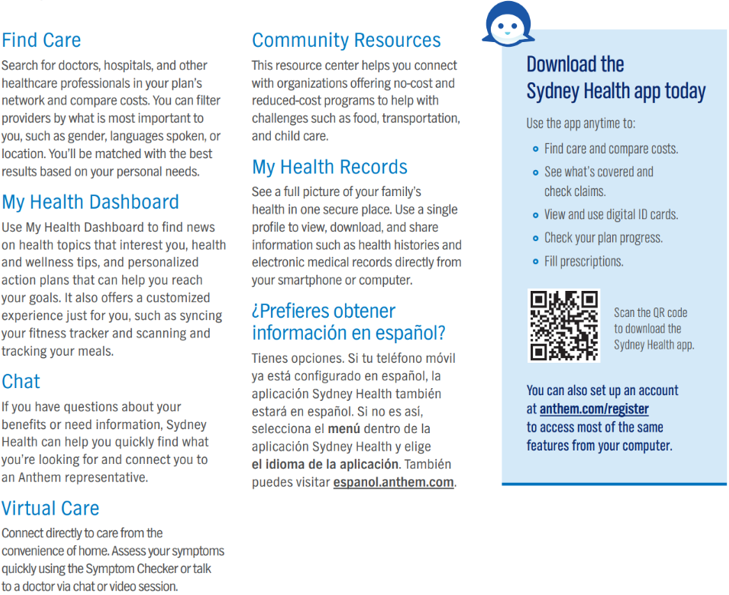
The SydneySM Health app is a free Anthem Blue Cross Blue Shield app that gives you fast and convenient access to your health insurance information right on your phone. It’s like having a personal health assistant in the palm of your hand.
What Can You Do With Anthem’s Sydney App?
Find A Doctor And Check Your Costs
Search for doctors, hospitals, labs, and other health professionals in your plan. You can search by name, location, and type of care. You can even filter by gender or languages spoken, and then check costs before you go to find what’s best for you.
View Your Claims
Check medical claims with one click. That means you can spend more time focused on your health and less on managing your healthcare benefits.
See All Your Health Coverage Benefits
The Sydney app shows you essential information at a glance. Whether that’s an overview of your plan, health reminders, or suggestions for wellness programs. You also can find your deductible, copay, and share of costs.
View And Use Your Anthem Digital ID Card
You’ll always have your most current Anthem ID card handy. You can use it just like a paper one when you visit the doctor, pay for care, and more.
Use The Chat To Find Answers To Your Questions
Just type your questions in the app and receive the answers you’re looking for. Plus, Anthem’s Sydney app can suggest resources to help you understand your benefits, improve your health, and save money.
24/7 NurseLine
24/7 NurseLine serves as your first line of defense for unexpected health issues. You can call a trained, registered nurse to decide what to do about a fever, give you allergy relief tips, or advise you where to go for care. A nurse is always available to help answer your questions.
The Anthem Nurseline can help you with:
- finding care from a doctor, hospital, or specialist in your area.
- enroll you in health management programs through Anthem for certain health conditions.
- remind you about scheduling important screenings and exams.
- provide guidance during natural catastrophes and health outbreaks.
- offer links to health-related educational videos or audio topics.
Call the NurseLine today at (800) 337-4770.
What is the health management program?
Get tools and support for managing chronic conditions:
- diabetes
- asthma
- heart disease
Anthem health advocates can help you follow your healthcare plan.
For more information about the program, call Anthem at (866) 962-1071

Anthem ID Card
Your Anthem Blue Cross Blue Shield insurance card contains all the necessary information you need to use your health insurance. Once you sign up for an Anthem plan, you will receive an Anthem ID card. The ID card envelope will not show that it is coming from Anthem. Be on the lookout for a blank white envelope in the mail.